
Scheduling A Telehealth Visit
Telehealth appointments are a flexible, supportive way to stay connected with your care team from the comfort of your home.
Your Fertility Care, Wherever You Are
Whether you’re starting your fertility journey or continuing treatment, virtual visits allow us to provide personalized care while reducing the need for in-person office visits.
To schedule a telehealth appointment, please call us at (860) 507-0493.
Already Scheduled for a Telehealth Visit? Here’s What to Expect:
Step 1: Confirm Your Appointment
You’ll receive an email with your appointment details and a secure link to join your virtual visit via Microsoft Teams. Please click ‘Accept’ in the email to confirm your attendance.
Step 2: FOR NEW PATIENTS ONLY – Complete your New Patient Paperwork & Welcome Packet
Please ensure that you have received emails from us regarding setting up your IMS Care Portal and EngagedMD accounts. You must complete the medical intake form in the IMS Care Portal and the consents and learning modules in EngagedMD before your new patient appointment. If you have not received these emails or if you are having difficulty accessing the Care Portal or EngagedMD, please contact us for assistance at [email protected].
Step 3: Join Your Telehealth Visit
You can access your appointment using either the web version of Microsoft Teams or the Teams mobile/desktop app:
- Web Access: At your scheduled time, click the ‘Join Microsoft Teams Meeting’ link in your email. Select ‘Continue on this browser’ to join without downloading the app. Note for Apple users: Safari is not supported. Please use Chrome or another browser.
- App Access: If you prefer using the Microsoft Teams app, click the meeting link ahead of time and follow the prompts to download and set up the app. Please allow extra time before your appointment to complete setup.
Your provider will join at the scheduled time or shortly after. We appreciate your patience in the event the previous appointment runs longer than expected.
Request Appointment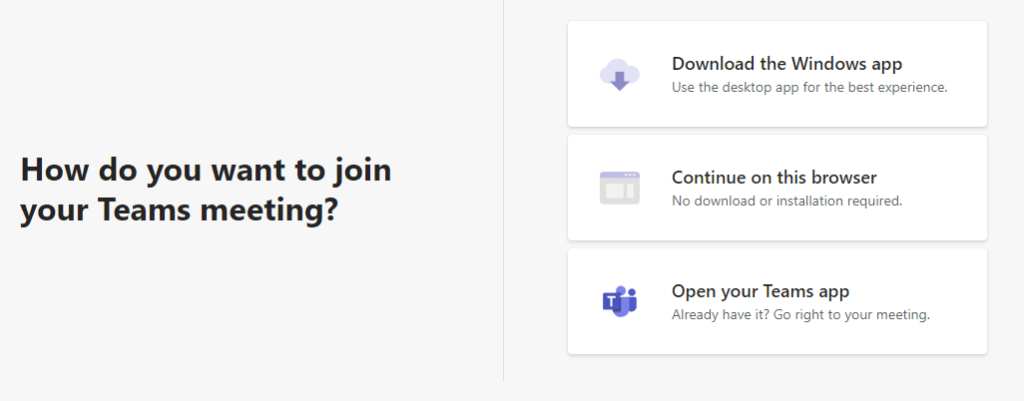
Quick Links for
What to Expect at Your Visit
- Morning Monitoring
- Scheduling A Telehealth Visit
- Communicate with Your Team

Financial Options for Fertility Treatment
Cost matters, and our financial specialists provide compassionate, one-on-one guidance to help you understand insurance, finance plans, and available support—so you can focus on your family. We offer discount programs and tailored support to members of the military and veterans. We are proud to partner with financing lenders to provide low monthly payment plans and flexible payment options.
Learn More